


[Note, while going through old blog notes and drafts, I left a lot unfinished for way too long. This is an example of one, now published on 2026-03-15. However, since I wrote enough to be apparent it was complete enough, I have backdated to the day I wrote it. I am leaving it basically untouched otherwise, except some formatting fixes.]
The last few years have seen a huge uptick in people adopting personal health/fitness wearable devices.
forget password, app won’t collect data from device days later when fixed, data is lost

2nd time password reset borked, 2nd time over a weekend
2014-05-06 – pre-order, Estimated Ship Date: August (ASAP) 2014
2014-07-28 – amiigo team update
2014-08-27 – amiigo team update
2014-09-03 –
2014-10-30 –
2015-03-27 –
2015-04-07 – receive amiigo
2015-04-08 – “Now that I finally have the device, what is the best way to provide feedback? Specifically, software bugs, design flaws, and an increasing list of reasons I am already not happy with the device.”
2015-04-08 – “You can do this by going into the app and then to MENU -> SETTINGS -> MISC -> SEND FEEDBACK”
2015-04-08 – “Happen to have any more mature feedback setting that allows me to add screenshots and type out detailed descriptions? I’d rather not poke away at my phone for half an hour. If not, I will just write public blogs criticizing your product and send them via Twitter to @GoAmiigo instead.”
2015-04-08 – “No Problem, you can always send me the problems that you are having and I can forward them to the development team.”
2015-04-09 – Wristband problem
took around 2 weeks before it finally clasped together reliably
I have used the Amiigo for two full days now. In that time, it has come off my wrist:
#1 While sleeping first night
#2 While sleeping second night
#3 When drying my arm after shower (towel barely brushed against it)
#4 Sitting at lunch, because my jacket sleeve was moving over it
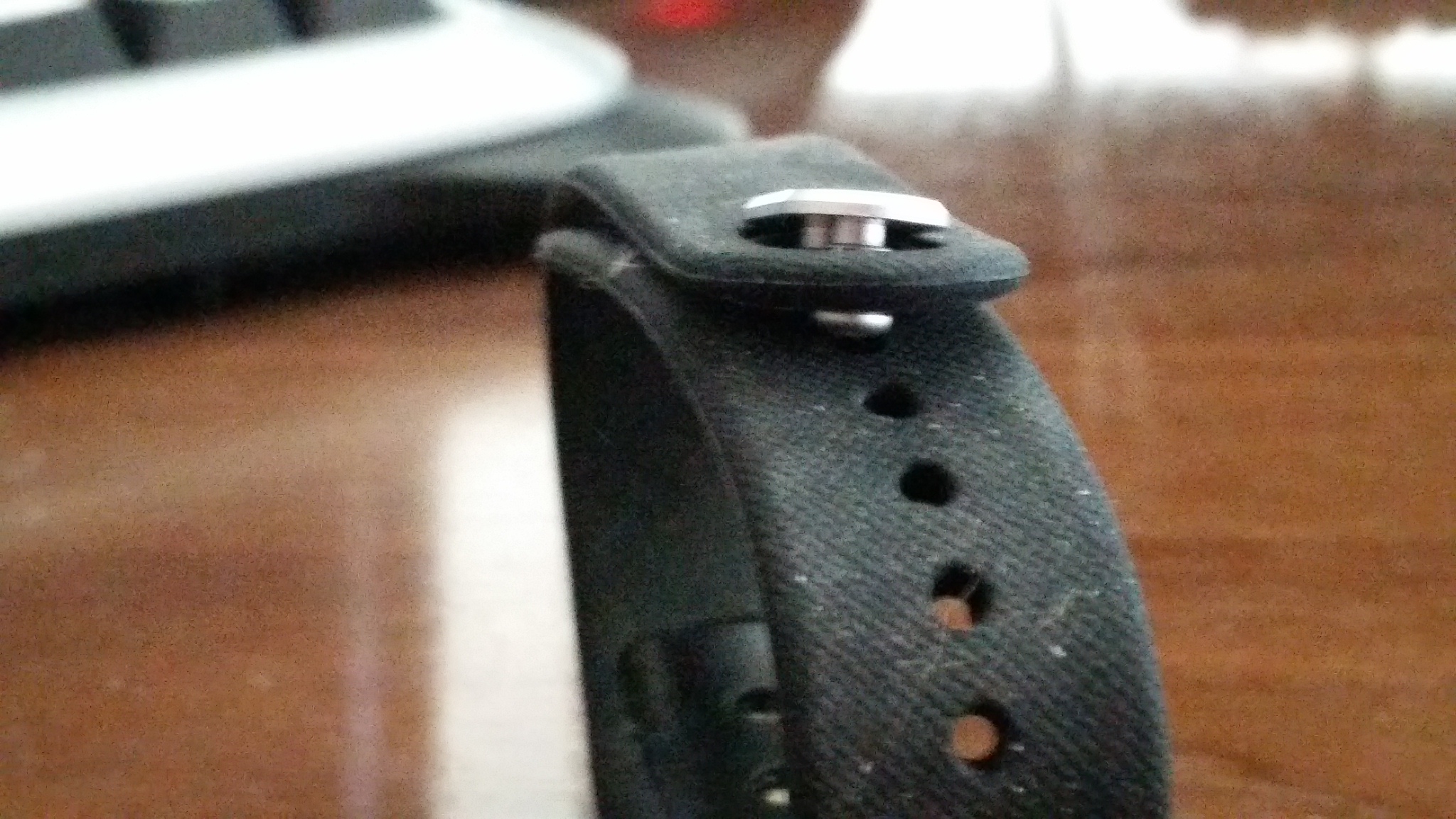
“Securing” the Amiigo to my wrist, and that term is really not appropriate, is annoying. Pulling it tight enough to ensure it makes contact with my wrist per your instructions (“snugly against the top of your wrist, just above the wrist bone.”) with one hand is not trivial. Pushing the two prongs into the holes results in one securely fastening, and one popping out almost immediately. Any level of movement will cause the second to pop out.
As a demonstration, I secured the wristband to itself without wearing it and set it on my desk. Within 60 seconds, the second prong had already come out on its own. See the attached picture for demonstration.
A device with this purpose cannot come off the wrist so quickly and so easily. It defeats the purpose of monitoring your body metrics.
This fastening mechanism was poorly designed and not well thought out.
2015-04-09 – Wristband housing problem
In addition to the first flaw, the rubber housing that holds the actual Amiigo device is not designed to sufficiently hold it in place.
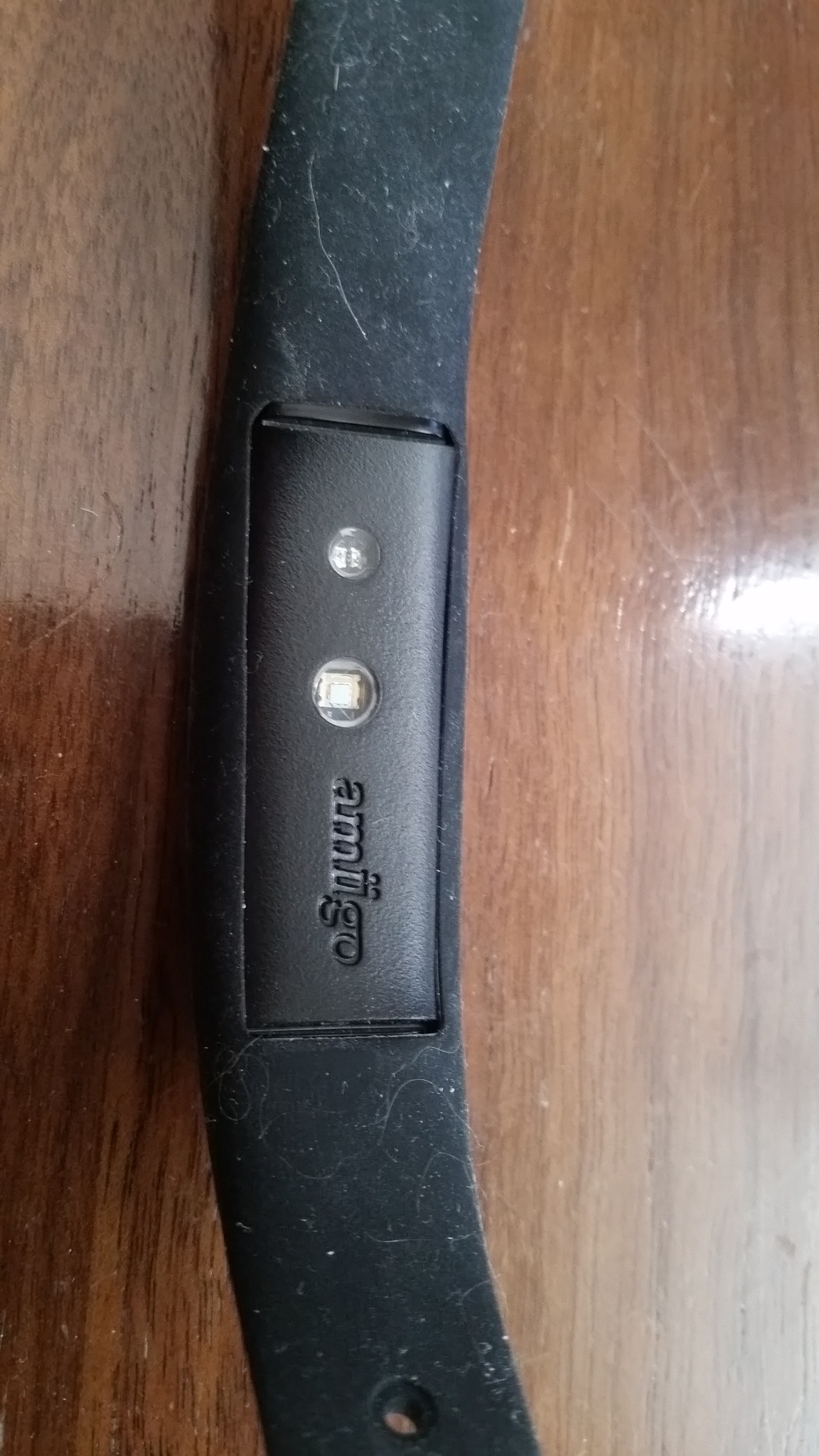
Three of the four times the entire wristband came off my wrist (ref: Design Flaw #01 under separate mail), the actual device further came out of the rubber housing. Waking up without a wristband, and then having to search the bed for the small device is annoying and unnecessary. When the wristband fell off after a shower, it fell onto a towel covered floor and the device popped out.
As a demonstration, just placing the wristband on the desk with the device down will cause it to already peek up out of the intended rubber molding. With one side already coming out, it is trivial to see why this housing design is not sufficient for active wear.
I can imagine the intention is to have it removable to swap into other wristband housings (e.g. for color choice, style, etc). However, if the rubber molding came up over the device another 1/8th inch, it would be considerably more secure in the housing while being able to be easily removed.
2015-04-09 – Amiigo App UX Error Message
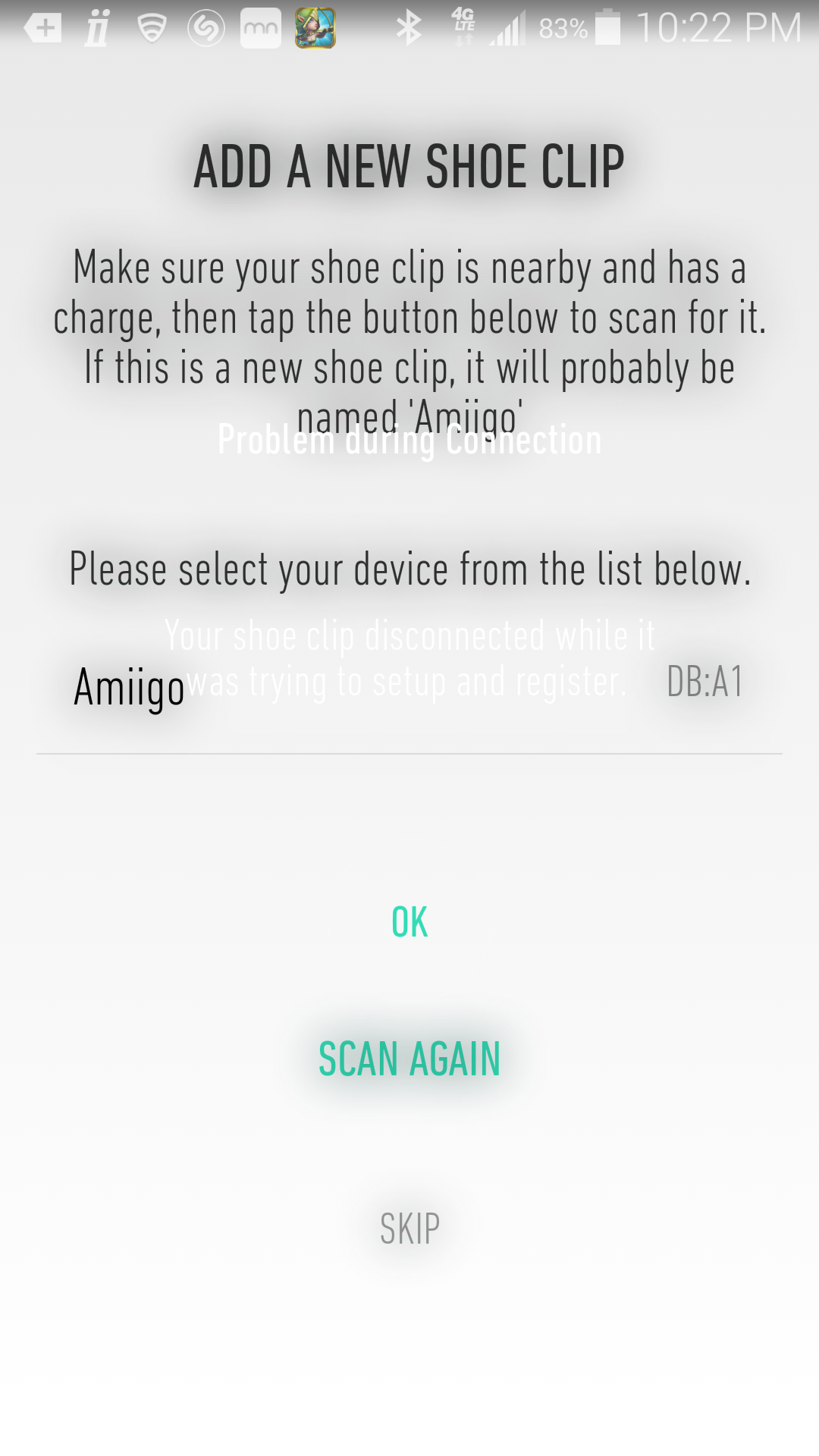
This is a User Experience (UX) issue primarily. When configuring my device for the first time, it took five attempts to pair with the shoe clip for some reason. Each time, the error message displayed was basically unreadable due to the use of a white font on an off-white background. Screenshot attached.
2015-04-09 – Amiigo Bug / UX Information Missing
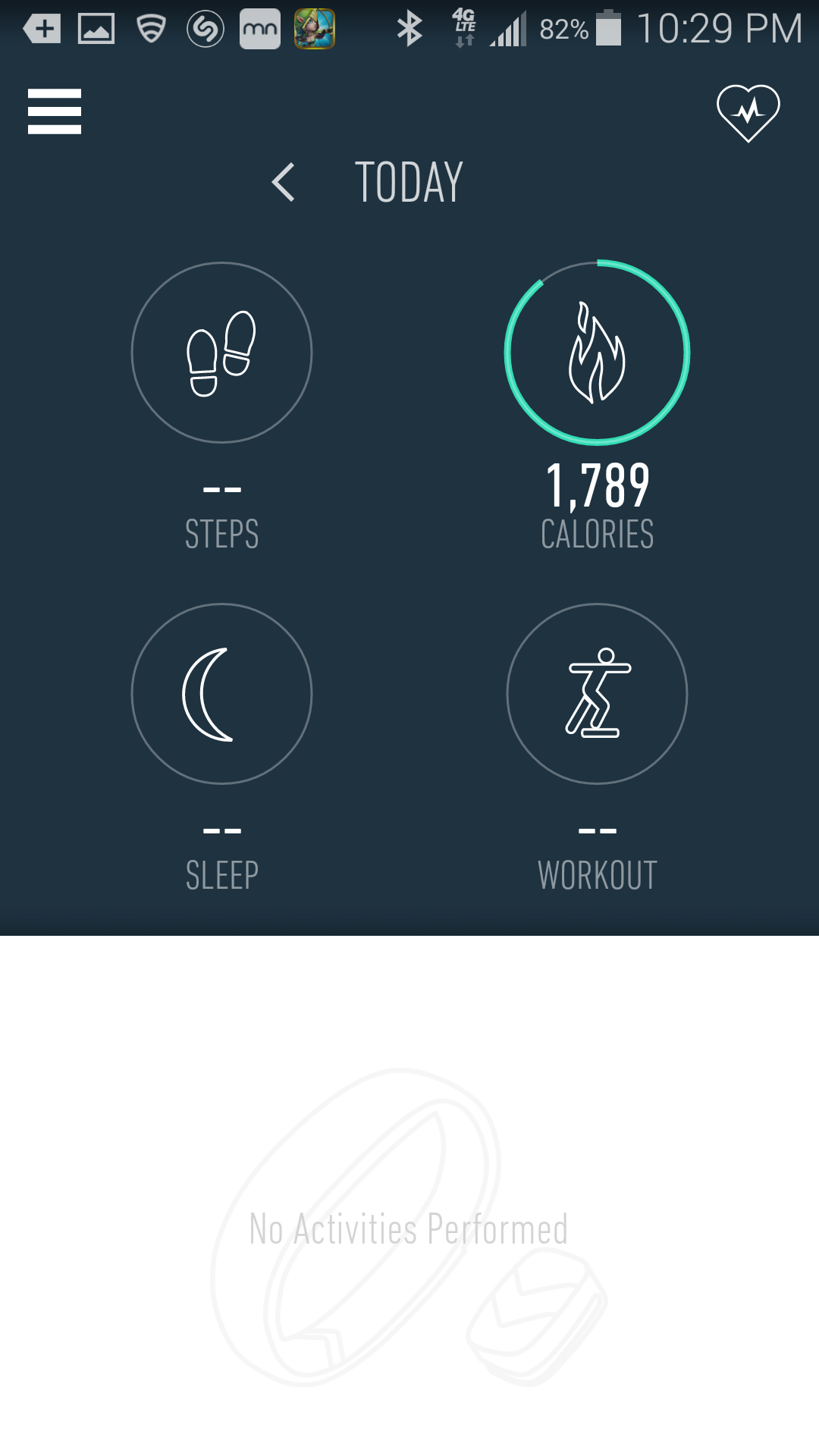
Upon first getting setup, the status showed ‘no activity’ yet 1,789 calories burned. That is a very specific, very high number given I had been wearing the device for all of two minutes.
I can guess that this is projected based on my ‘calories burned per minute’ extrapolated from the biometric information taken via the wrist. This should be disclaimed or explained in some fashion. For example, if I tap “calories”, nothing happens. No break down of where that data comes from, no explanation of how that number is calculated. This is a very simple, logical UX mechanism that people are accustomed to. Tap an element to receive more information.

2015-04-09 – Amiigo UX Main Screen
As mentioned briefly in another mail, the primary interface gives four large circles with the basics. Yet, tapping each one does nothing. In the way of User Experience (UX) this is incredibly poor.
Tapping on ‘steps’ should give me the same graph I get from tapping on the ‘steps’ displayed on timeline.
Tapping on ‘calories’ should give me a breakdown of how that number was achieved.
Tapping on ‘sleep’ should give me the biometric information from that night.
Tapping on ‘workout’ should list all of the exercises I performed to reach that calculation.
2015-04-09 – App Missing Steps / Heartrate Info
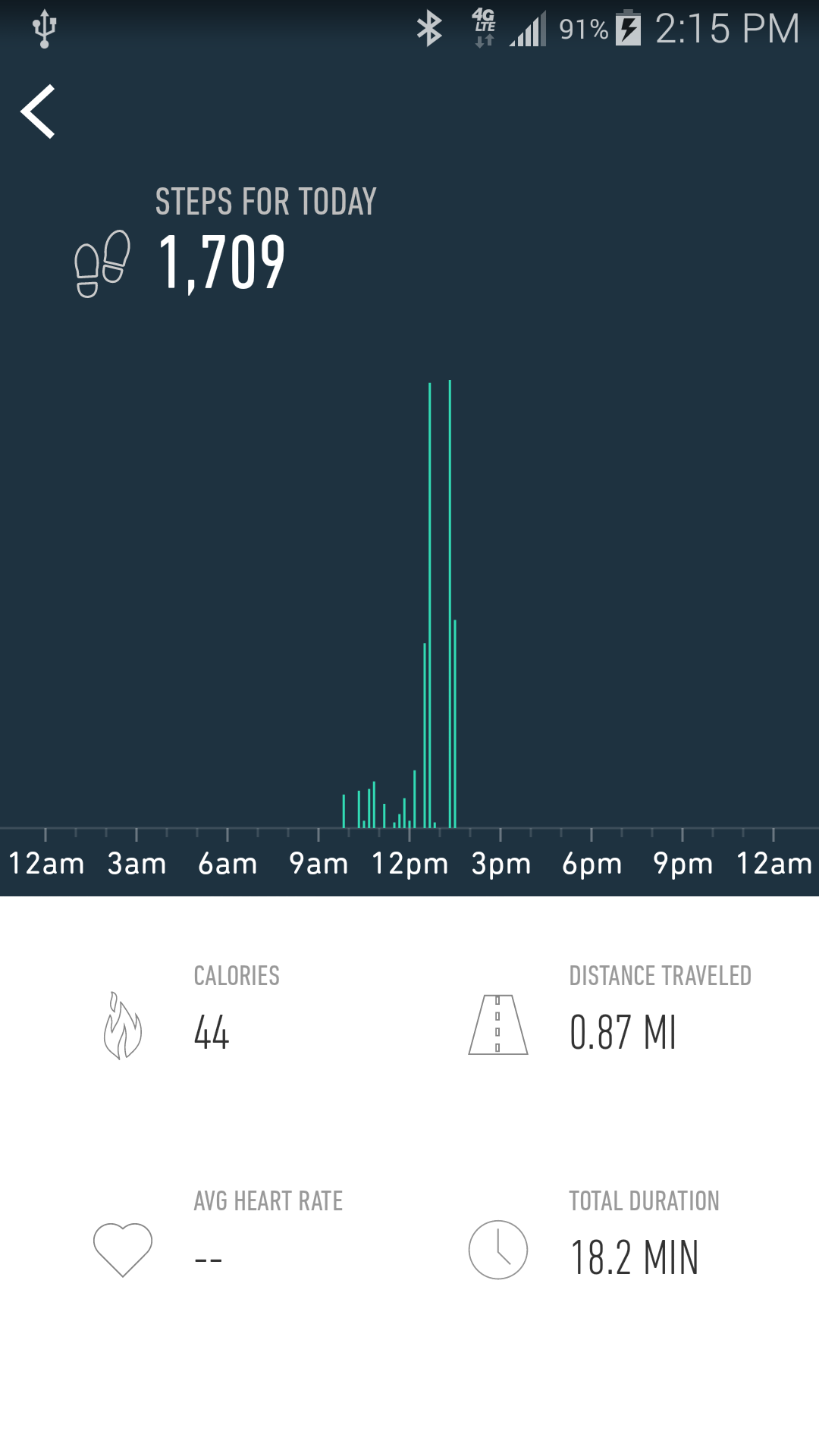
In the attached screenshot, why is the average heart rate not displayed?
If there is an error in collecting data from me (e.g. device not making sufficient contact), I should receive a warning from the app saying so. If it is a case of data being available for only half of that walk (since the device came off due to wearing a jacket), it should say so.
2015-04-09 – App UX Sleep Info
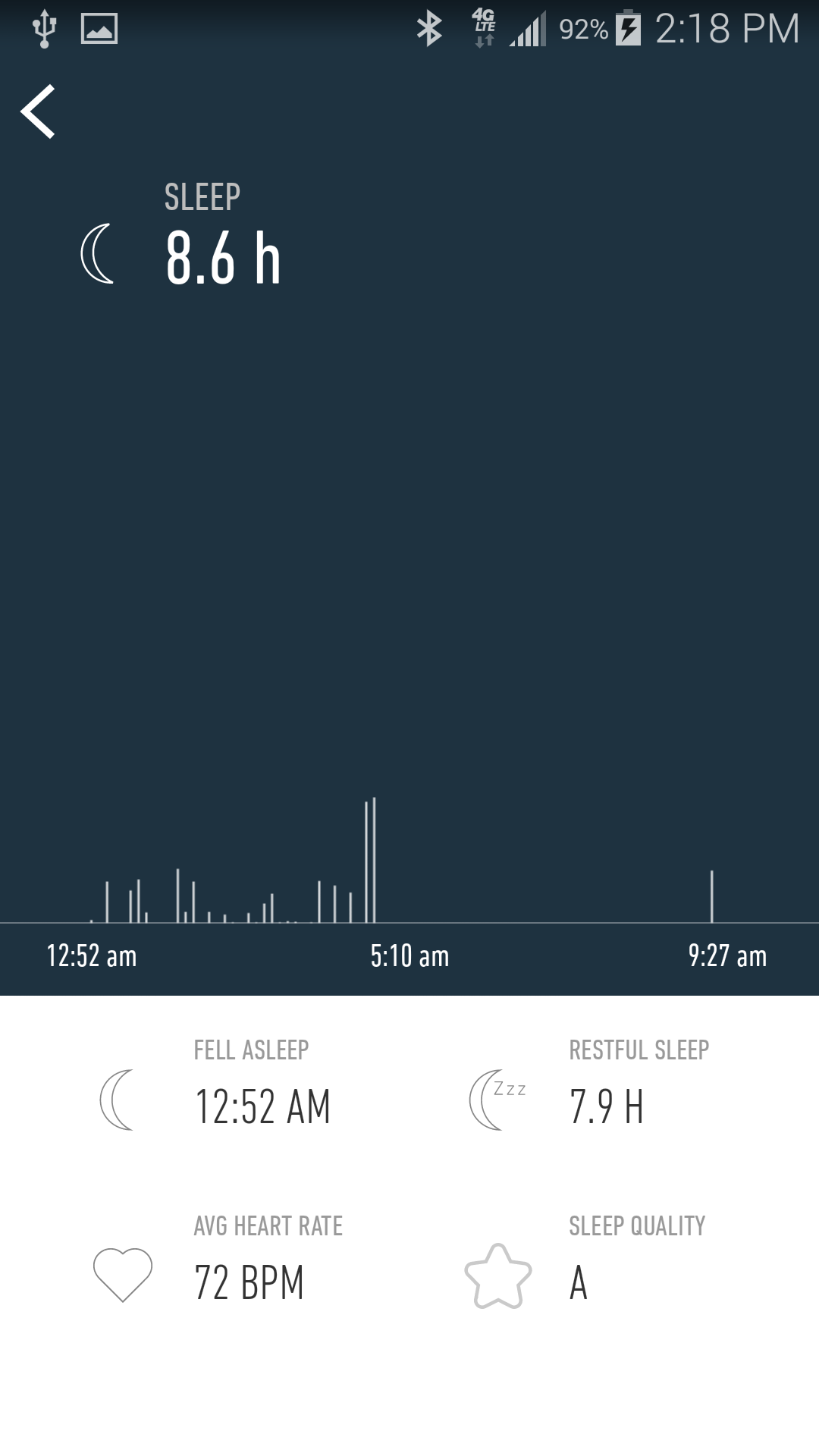
There is a lot of dead space on the sleep information screen, via the timeline. Rather than show all the wasted dark space at the top, this should show more statistics that are helpful.
Clicking on the heart from the main screen shows that you are able to track respiratory rate, oxygen saturation, BP variations, etc. These should be shown for the period of sleeping on the above mentioned screen.

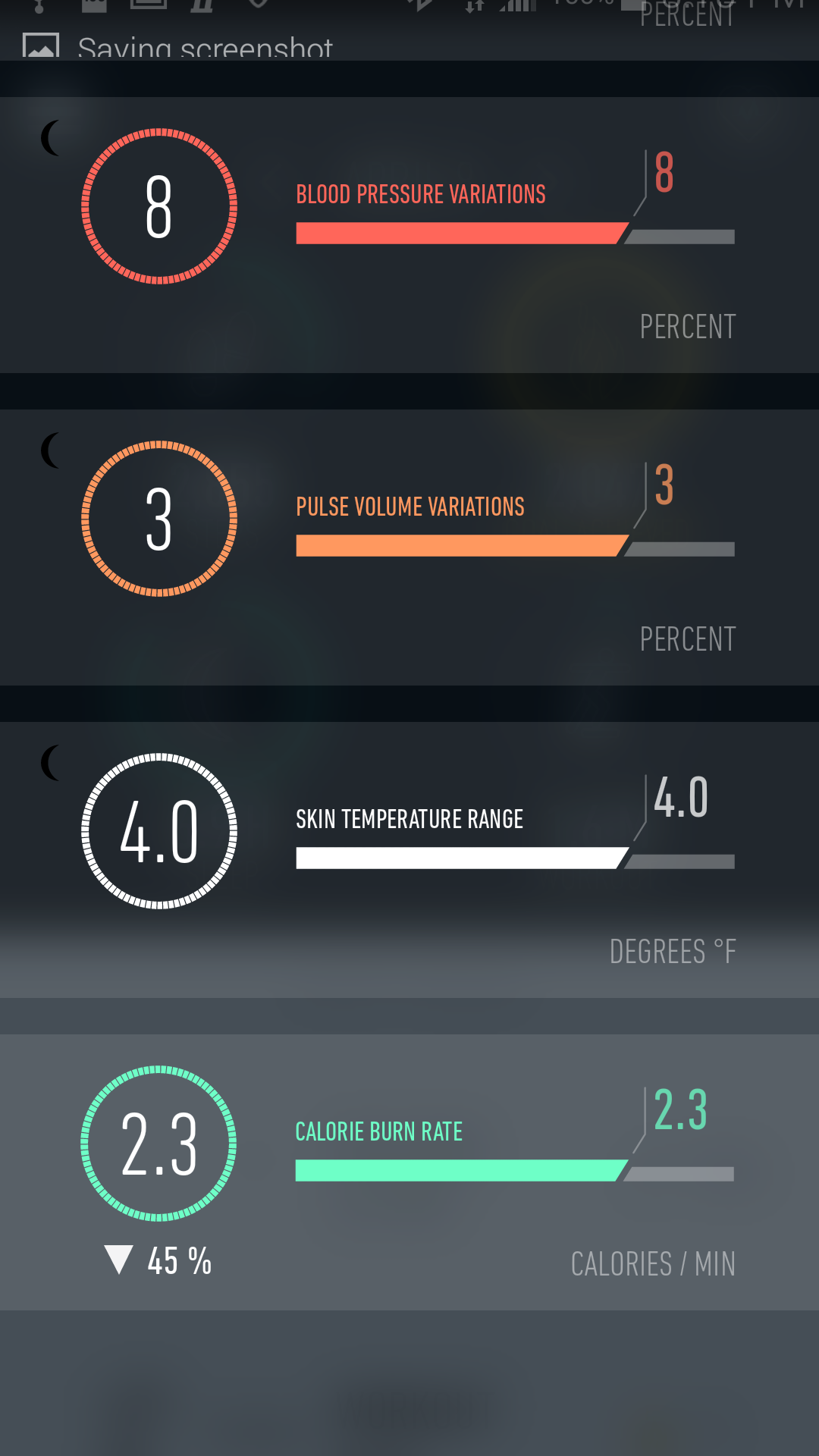
2015-04-18 – App Bio Screen
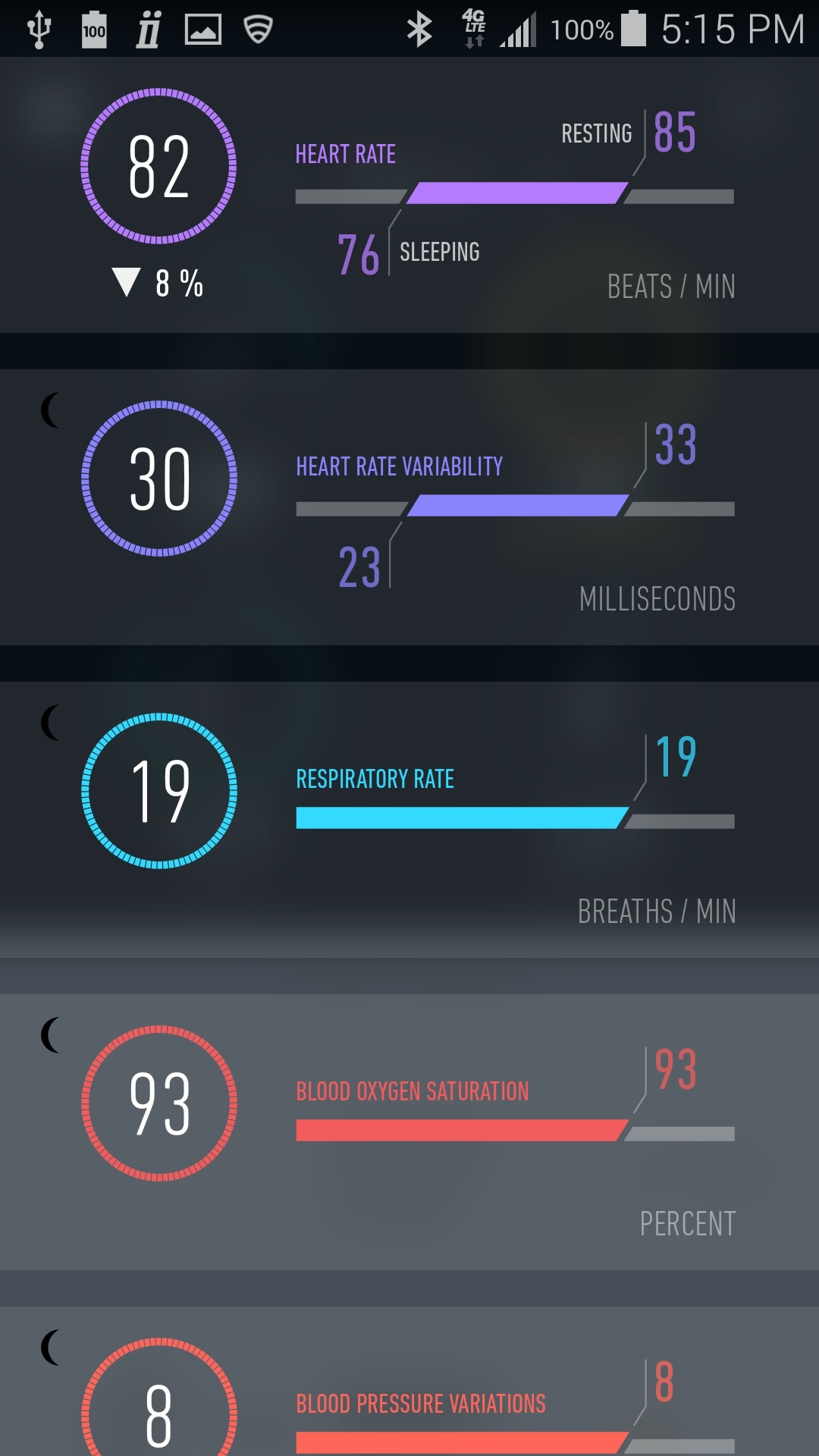
When clicking on the ‘heart’ logo in the upper right, it takes you to the biostats screen which was a huge selling point for me. On that screen we get 8 different types of information. Unfortunately, several of them are not well explained anywhere.
For each one, tapping it should take the user to an information screen that fully explains what that biostat means. As appropriate, per doctor recommendation, including ‘normal’ ranges would be helpful. Below are the categories and the questions I have, which I assume other users might. Even if these are explained on a web page somewhere, that isn’t convenient. Having it in-app is more intuitive and helpful.
For example, ‘Heart Rate’ shows 88 sleeping, 92 resting. Does this just average those times, or does it factor in a workout? What does the up arrow and 8% mean exactly?
Heart Rate Variability… what does this mean?
Respiratory rate… is mine normal? Does this average the entire day?
Blood Oxygen Saturation… something I am specifically interested in. I see my average is 93, but having this broken down between waking and sleep would be VERY helpful, as that is one indicator for diagnosing sleep apnea for example.
Blood Pressure Variations… 6. Errr throughout the whole day, there were only 6 variations of my BP? Is the device capable of taking my BP to any reliable degree? If so it should. What does ‘6’ really mean and what does the up arrow and 20% mean?
Pulse Volume Variations… 2. No clue what this means either.
Skin Temperature Range… 0.5 F, with an up arrow and 200%. 200%?! That seems alarming on the surface, but I don’t know what it means, what the ranges are, or how this helps me.
Calorie Burn Rate… shows 12p – 1p 2.5 and 1a – 2a 1.4, with an average of 1.5 in the circle. Those two numbers don’t average to 1.5, so are those the start/end of day? Why can’t I see the burn rate hourly for the entire day? What formula are you using to determine this?
[NO REPLY from vendor to above questions]
2015-04-18 – General App Issues
#1 The app wants me to login again. At no point during this process did I seem to write down my credentials, which is odd to me given the 11 pages of printed credentials to every web site or app I have ever logged into.
#2 Going to the main site, no indication of logging in, resetting a password.
#3 Digging up the ‘confirm your account’ mail, clicking that link, and getting a ‘500’ error (meaning your system wasn’t expecting it, at all).
#4 The app does not make it clear if it wants a username, or an email address as the login name.
#5 Use the app and click ‘request username’, add my valid address, “There was an unknown error. Please try again later.”
#6 Use the app and click ‘forgot password, add the username I think I used, “There was an unknown error. Please try again later.”
So I am stuck, unable to use the Amiigo offering, because there is apparently no QA involved in your application.
I get that startups are rough… but generally, they are solving problems no one has run into it, answering for features and issues that aren’t on the market. These? They are straight from 1996. Pretty disappointed.
2015-04-23 – App Battery Warning
I am getting a notification with the Amiigo icon, the drop down says “Amiigo Battery Alert, Press to open Amiigo”.
I press the alert, which opens the app. Then… nothing.
No indication of which device is having battery issues, or how far drained it is.
This is on the back of my shoe clip apparently not needing charging the last *3* days. When I put it on the charger the last three nights, green light.
reply: You will need to go to your Main Menu > Tap onto the Wristband icon > you will see both your devices and the %’s letting you know which device needs charging.
In that case, clicking on the warning from the Android bar shouldn’t just load the app, but take the user to this page specifically if possible.
Also curious, I charged by band overnight (8 hours), and it is reporting 86% charged now. Additionally, what is “BLE Safe Mode”?
[NO REPLY from vendor]